Learn harmony by singing and hearing it
An experiential course through W. A. Mathieu's Harmonic Experience — plus playable labs for every diagram.
Guided lessons walk the book's path: sing sa with a drone, feel ratios as rhythm, build the five-limit lattice tone by tone, then hear what equal temperament hides — the commas. Every map from the book is also a clickable instrument.
Mode du jour
Mathieu's daily prescription: one mode, sung slowly over the drone, every day.
What's new
New here?
What is this site?
An experiential school for W. A. Mathieu's book Harmonic Experience: you learn harmony by singing over a drone and hearing pure ratios, not by memorizing rules. Guided lessons live under Learn; free-play instruments live under Labs.
Do I need the book?
It helps — every lesson cites its chapter and pages — but the lessons paraphrase the teaching and all practices work on their own.
Do I need to read music?
No. Everything here is taught by ear, by ratio, and by map. The one staff-notation view is optional.
Do I need to sing well?
No — learning to sing in tune is the practice itself, and the microphone tuner gives you honest feedback. No microphone? Every exercise also works by ear.
Diagram coverage
0 source diagrams, tables, maps, and compendia are inventoried. Each entry opens a playable model: lattice, mode, comma, cadence, cyclic sequence, key-chain, or chromatic superimposition.
Make sound
Enable audio once, then click tones, ratios, chords, diagrams, cadence steps, and composer cells. The same synth engine is shared across the whole site.
Create
The composer turns selected diagram material into a 16-step sketch. Export a JSON sketch or copy a note/chord sequence for later work.
The experiential course
Learn: Harmonic Experience, chapter by chapter
Guided lessons paraphrase the book's path and turn each practice into sound: sing over the drone (with a live microphone tuner), feel ratios as cross-rhythms, grow the lattice tone by tone, compare just and tempered tunings, and hear the commas work. Enable audio once in the footer, then begin.
Practice keyboard harmony in the Score & Harmony Studio →
Mathieu diagrams and Liebman studies
Diagram Atlas
Explore Mathieu's indexed diagrams and selected studies based on Liebman's chromatic concepts. Each entry identifies its source and any teaching choices. Use the filters, then open an entry to hear it.
Keyboard harmony · listen, sing, realize
Score & Harmony Studio
Follow four independent voices. Hear a missing part in your mind, sing it against the others, and compare five ways of understanding the same passage.
The footer tonic transposes the whole score. Sound and tuning apply to all four voices.
Click a note to seek. Scroll horizontally to read ahead. French figures appear below the bass.
Practice this study
Sources and analytical choices
The practice sequence adapts Bonet's emphasis on keyboard realization, preparation, and the life of each voice. The three short scores and their analyses were written for this app. These are curated readings, not automatic judgments of arbitrary music.
French figures follow the conventions checked in the published previews. The Mathieu view states one tonic-centered five-limit interpretation. The functional and jazz views retain their own assumptions; the arranging view describes the actual registered notes.
Bonet: Given Basses and Melodies, introduction, pp. 9–10
Bonet: Fundamental Principles, pp. 78 and 94 (French figures)
Notation engraved with VexFlow 4.2.5, bundled locally under its MIT license.
Staff notation with lattice location
Staff + Lattice View
Choose a book-derived pitch diagram, read it on a standard staff, and play it while the corresponding lattice tones or chords light up. Press [ and ] to step through the events one at a time; arrow keys move the lattice selection here too.
Open scrolling SATB scores with voice controls and five analyses →
Single-note lattice control
Melodic Lattice Lab
Use the lattice as a single-note instrument. Cursor and mouse movement select one lattice tone at a time for melodies, scales, and interval paths.
Select a node.
Chordal lattice control
Harmonic Lattice Lab
Use the lattice as a chord instrument. Cursor and mouse movement select a lattice position and sound the chord generated from that location.
Select a node.
Major/minor triangle lattice
Triadic Lattice Lab
Use the chapter 21 note lattice where each connected triangular face is a major or minor triad. Click or arrow on a root for major; hold Shift for minor.
Select a triangle or note.
Modes as lattice selections
Mode Workshop
Compare church modes, mixed modes, Magic Mode, and chromatic-pair variants as sets selected from the lattice. Clicking a degree plays it; playing a mode traces its tone path. Press [ and ] to walk the mode line one degree at a time; arrow keys move the selection around the lattice.
Mode matrix — upper tetrachord over lower
Functional motion
Cadence and Sequence Lab
Cadences occur on the triadic lattice. Each chord lights its root and member tones; playback steps through the cadence as functional motion across the lattice. Press [ and ] to step back and forward through the chords; arrow keys move the selection around the lattice just like in the lattice labs.
Liebman-style chromaticism
Chromatic Jazz Lab
Hear a melody against its underlying harmony. Follow the source of each phrase, try a half-step displacement, or establish a temporary tonal anchor.
Liebman structures on Mathieu's map
Voicing Lattice Lab
Pick a chromatic voicing structure, then click lattice roots to plant it anywhere on the map. Play it parallel (exact transposition, Liebman's planing) or adjusted to a mode of the tonic — the mode chosen as an upper tetrachord over a lower tetrachord, Mathieu's chapter 12 construction. Press [ and ] to step through the saved sequence without looping; arrow keys move the planted root around the lattice.
Pick a structure, then click any root.
Play in just intonation
Tuned Keyboard Lab
An onscreen keyboard tuned by the lattice: in Just mode every key sounds its five-limit ratio over the current tonic; in Equal mode it plays the ordinary piano pitches. Use your computer keys (A–; row), click, touch, or a MIDI keyboard.
Play a key. In Just mode the readout shows the ratio each key uses.
Harmony as geography over time
Analysis Lab
Positional analysis, the book's capstone: watch real phrases move across the lattice on a timeline. Below it, build key chains by a chosen ratio between tonal centers, and visit the septimal corner where the blues lives. Press [ and ] to step through a phrase chord by chord.
Compare French, Mathieu, functional, jazz and arranger readings of a score →
Positional analysis player
The folding plane
Key-chain builder
The septimal corner — a third dimension
A practice that knows you
Practice Room
Daily guided sessions, adaptive ear training that targets your weak degrees, sung phrases scored by the tuner, melodic dictation, and a blind comma-hearing test. Progress feeds the lattice heatmap below.
Make music from the maps
Composer
Build a 16- or 32-step sketch from diagrams, modes, cadences, or chromatic lines. Click a cell to fill it from the selected diagram; Shift-click cycles its length (1, 2, or ½ beats); Alt-click clears it to a rest. Swing delays the off-beats. Playback runs in the browser synth, and MIDI export carries just-intonation pitch bends.
Look anything up, then play it
Ratios, Modes & Commas
Charts and tables to look things up in. First the seven modes drawn on the lattice; then every tone of the extended lattice with its ratio, cents, and deviation from equal temperament — click a column header to sort, click a row to hear it over the tonic. Below those: the four commas, and the course glossary.
The seven modes at a glance
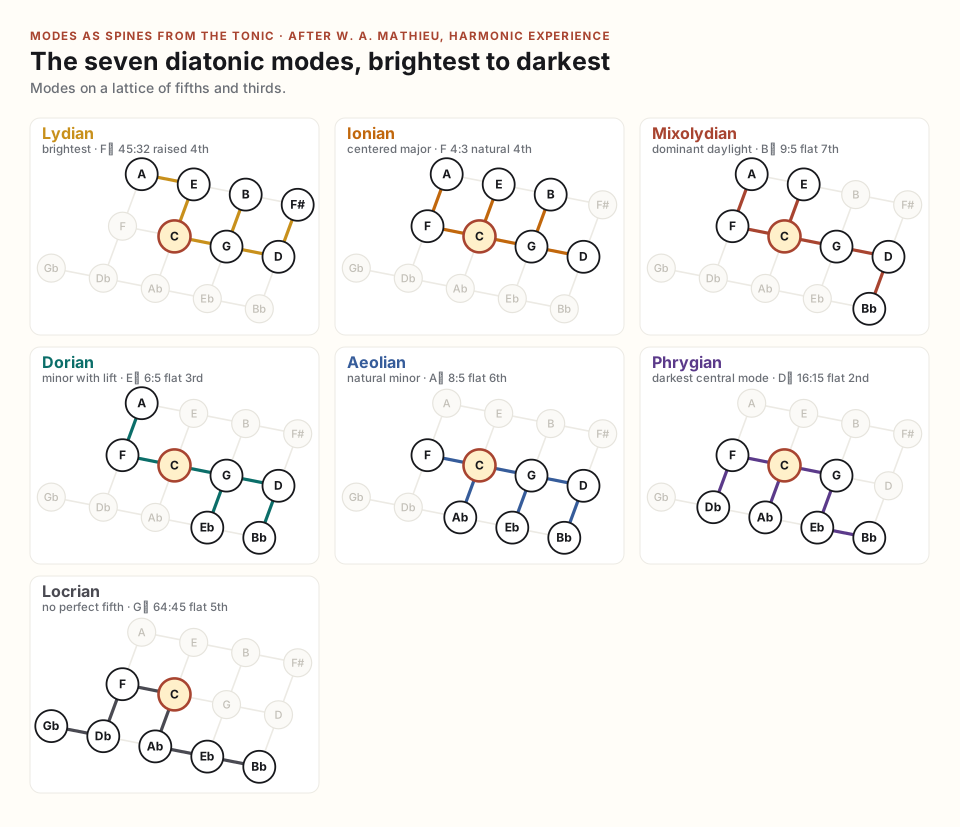
Each mode flattens one more degree than the one above it, sliding its tree west and south. Play any of them in the Mode Workshop.
Index of ratios
The commas
Glossary of singable tones
Lattice tones only, wired to the tuner. The complete book table — with the equal-tempered reference tones, the quarter-tone split points, a drone picker, and family filters — lives on the Singable Tones page.
Glossary
Reference · the seven-limit lattice
3D Harmonic Space
Walk in fifths, major thirds and harmonic sevenths. Follow different paths to almost the same pitch, hear the gap, then discover how temperament lets harmonic space wrap around.
Fifths · 3:2Thirds · 5:4Sevenths · 7:4
21.51¢ apart
Click a node to play; drag to rotate. Auto rotate turns all three axes; dragging or Reset view pauses it. Anywhere on this page: ← → fifths, ↓ ↑ thirds, Page Down / Up sevenths. Combine directions; Ctrl moves two steps. In Harmony mode, Shift plays minor chords and keys 1–6 set chord length. Space replays the selection.
Tonic · 1
Played tones and chords appear here as a path.
Each tone is octave-reduced independently into your range. Labels omit octave factors.
What wraps around?
Include 7 starts off: the open lattice is a fifth/third plane, the cell has paired edges, and Wrapped Space is a two-torus. The chord demo is a 4:5:6 triad. Turn Include 7 on to add seventh relationships; tetrachord scales are unchanged.
In pure tuning, different fifth / third / seventh addresses remain different pitches, even after octave adjustment. The dashed connection joins two nearly matching endpoints. In 31-tone equal temperament, the three comparisons here close exactly.
Choose Wraparound cell and move the tuning slider. At 31-tone equal, a path leaving one face continues at its paired face. The skewed cell is a view of a three-torus: its three periodic directions combine harmonic steps.
Wrapped Space bends the three periodic directions into continuous curves. Pure commas separate near-return points; 31-tone tuning joins them. The faint loops show the fully closed space. This is a projection into three dimensions: curves can cross on screen without identifying their tones.
Demo · Bach plays the complete Invention No. 2 in C minor, BWV 773, with piano, automatic rotation and sevenths off. Upper and lower voices have separate trails. This is a 31-tone lattice realization; notes octave-reduce into your vocal range. Exit demo or Escape restores your previous view. Public-domain score: Mutopia / Bach-Gesellschaft; ornament signs and the final fermata are not expanded.
The three boundary identifications
In (fifths, thirds, sevenths) coordinates, the cell edges are (4, −1, 0), (2, 2, −1), and (1, 0, 3). These become unisons after octave adjustment in 31-tone tuning. The cell contains 31 pitch classes. During folding, position is an illustration of the identification; it does not measure frequency.
Fokker: unison vectors and periodicity blocks · Baez: the mathematics of tuning systems
Sing the relationship
Use the footer’s tonic drone as your ground. Build the 4:5:6:7 chord, then hold a single tone and sing it against the drone. The chord’s four vertices form a tetrahedron: tonic, major third, fifth, and harmonic seventh.
A vocal range limits register, not harmonic distance. Every chord tone is octave-reduced independently; a range of at least one octave accommodates every pitch class. Change the neighborhood size to see more relationships, and the low and high notes to fit your voice. Comma comparisons keep their two endpoints close together so you can hear the beating.
Lattice fractions omit every octave factor: a fourth sounding at 4/3 is labeled 1/3; a fifth is 3, a major third 5, and a harmonic seventh 7. Labels retain these harmonic identities in every view and tuning. At intermediate slider settings, sound interpolates in cents; at the right endpoint, fifths span 18, thirds 10, and sevenths 25 of the octave’s 31 equal steps.
Figure reference · the French conservatoire tradition
French Figured Bass
Read the figures used in the Vidal–Boulanger tradition, clarified by Narcís Bonet. Find a symbol, see what it asks for above the bass, and hear it. The examples are original illustrations of the notation.
Read upward from the bass.
3, 5, 6 and 7 count letter names above the bass. The key supplies their quality. Octave displacement and doubling are usually left to the realization.
In Bonet, + marks the leading tone.
His +6, printed on one line, gives D–F–G–B in C: D–B is a major sixth. His third-inversion figure is +4 over F. See Bonet’s printed table, p. 78. Elwart instead uses +6 for an augmented sixth; the source’s convention determines the reading.
A barred figure means diminished.
A slash through 5 specifies a diminished fifth; a slash through 7 specifies a diminished seventh. This is different from the raising slash used in some other continuo traditions.
Sources, edition differences & scope
This is a figure dictionary for reading the French teaching tradition, with a short explanation at each family. It covers the standard chord families and inversions, common retards, augmented sixths, and the signs used to build further combinations.
- Vidal / Boulanger, Recueil de basses et chants donnés, selected, revised and realized by Narcís Bonet, vol. I: Bonet’s introduction, printed pp. 9–10, places the basses in keyboard study. These examples do not reproduce his realizations.
- Bonet, The Fundamental Principles of Harmony, printed pp. 78 and 94: primary authority here for +, dominant-seventh inversions and other seventh figures. The preview does not include every advanced figure used on this page.
- Christophe Loup, dominant ninths and ninths without the root: supplementary French figure tables, including the printed order that constrains major-ninth spacing.
- Jean-Baptiste Voinet, retards: preparation, dissonance and resolution. The other suspension examples apply that reading principle to their stated intervals.
- Antoine Elwart, Petit Manuel d’harmonie (1862), §4: an older French source that uses + for augmentation. Its +6 must not be silently substituted for Bonet’s leading-tone +6. For altered chords, this page uses explicit pitch accidentals and spells the example out.
Figures usually leave register open, with the major-ninth spacing exception noted above. They do not specify a unique four-part solution. This reference explains the notation; a complete study of realization also requires part-writing, cadences, sequences, modulation and keyboard practice.
The book's full table, tuned to your voice
Glossary of Singable Tones
Doctor Overtone's complete glossary (pp. 530–531): every just ratio in the book, plus the equal-tempered reference tones and the quarter-tone split points between lattice tones. Pick a drone note and switch the drone on, then click any row to hold that tone over the drone (click again to release). ▶ plays a tone once; Tune makes it the target of the microphone tuner below. The colored chips filter by family.
How to use this site
Help
Everything here serves one practice: learning harmony by singing it and hearing it, following W. A. Mathieu's Harmonic Experience. This page explains every part of the site. Jump with the buttons, or read top to bottom.
Quick start
Audio unlocks on your first click anywhere. Then:
- Find your tonic. On Home, press Hum to find my tonic and hum your easiest note — the site tunes its drone to your voice. (Or pick a tonic by hand in any lab; C, B, or A suit most voices.)
- Begin the course. Learn opens the guided lessons; the three-minute first lesson samples everything. Lessons are meant to be sung, not read — leave the drone on.
- Return daily. The Practice page builds a short session for you; the 📈 button in the footer shows what's due.
Sound & the footer
The footer is the site's mixing desk, present on every page:
- Enable audio — a manual fallback; normally the first click anywhere unlocks sound. While audio runs it reads Stop audio and silences everything.
- Tempo — beats per minute for cadences, sequences, the composer, and arpeggios.
- Sound — the melody instrument. Warm tone, Vocal ahh, and Soft e-piano are synthesized; piano, violin, oboe, French horn and the leads are sampled. Sing-along targets always use the vocal voice regardless.
- Tuning — just ratios, equal temperament, quarter-comma meantone, or Werckmeister III, applied site-wide (see Tuning systems below).
- 🎚 Music — reference pitch (A4), drone timbre (including the plucked tanpura), a separate chord instrument, and the drone / notes mix sliders. ▶ Play test loop at the top loops a drone, melody, and chord so you hear every setting while you adjust it; it stops when the popover closes.
- 📈 Progress — weekly review, spaced-repetition reviews due, and custom phrase drills.
- ⚙ Learning — microphone sensitivity and check, singing octave, singing accuracy (Beginner / Intermediate / Advanced presets set how forgiving the tuner's green band and the sight-singing note lock are), and the reset / restore controls.
- ● Record output — records everything the site plays (drone included) and downloads it as an audio file. Press again to stop; auto-stops at three minutes.
The course (Learn)
About forty lessons follow the book's four parts, plus a Part Five on Liebman's chromatic approach and a starred checkpoint closing each part. Every lesson cites its chapter and pages.
- Sing cards — the heart of the course. Drone + target plays the tone to match; Drone only leaves space for your voice; Check my voice starts the live tuner (needle, scrolling pitch history, optional overtone spectrum, and a recordable ten-second take with a pitch trace).
- Rhythm trainers — feel a ratio as a looping cross-rhythm before hearing it as pitch. The tap loop runs until you stop it.
- Comparisons & comma demos — A/B buttons glow as they sound; "together" plays both tones at once so you hear the beating. These always use exact ratios, whatever the tuning switch says.
- Comma pumps — chord journeys tuned purely from chord to chord; compare the first and last tonic to hear the drift.
- Quizzes — the drone sounds, a degree plays, you name it. Questions adapt toward your weak degrees and feed the Practice heatmap.
- Mark as practiced — the checkmark drives your progress lattice, resume point, and part stars. Completed lessons offer review mode, which hides the prose and keeps the practices.
- Sharing — every lesson is a link (
#learn/lesson-id), and the 🔗 on each activity copies a link straight to that sound.
Practice Room
- Today's practice — a five-step guided session: sa, the mode du jour, your weakest degree, an ear check drawn from spaced-repetition due reviews, and a journal entry (optionally with an eight-second audio take).
- Your ear on the map — a heatmap of per-degree accuracy built from every quiz and dictation answer.
- Breath-counted sa — the book's eleven-breaths practice with a counter and drone.
- Sight-singing — a sargam phrase appears; the microphone advances you note by note as each locks. Load your own phrases from the 📈 panel.
- Duet — hold an interval against a walking root, or hold sa against a moving voice; the tuner's target moves with the music.
- Melodic dictation — hear four notes, answer by tapping degrees.
- Transposition drill — random tonics: name the degree you hear, or the letter a degree lands on.
- Name it four ways — drill the four naming systems against each other: ratio, sargam, solfege, interval name.
- Comma JND — a blind which-was-pure test that narrows the cents gap as you succeed; thirds, fifths, and sixths each keep a best.
- Loop layer — record eight seconds of your voice, loop it, sing the other voice over yourself.
The labs
- Diagram Atlas — every non-notation figure from both books as a playable model. Pick an entry, press Play diagram (path numbers light in order), Invert path reverses it, or send it to a lattice lab or the composer.
- Staff + Lattice — read book examples in four voices while their tones light on the lattice.
- Melodic / Harmonic / Triadic lattices — click to play; arrow keys walk the map (Ctrl skips two; Shift on the triadic lattice selects minor). The status strip shows each tone's ratio and your path's drift from equal temperament. Extras: a pedal-tone hold on any degree, saved and shareable journeys, the piano strip showing what temperament folds together, and (melodic lab) Track my voice — your sung pitch as a live dot on the map. Wheel-zoom and drag to pan; double-click resets.
- Modes — church and mixed modes as lattice selections, plus the 5×5 tetrachord matrix: every mode is a lower tetrachord plus an upper one.
- Cadences — cadence models stepping across the triadic lattice with animated voice-leading lines; common tones get hold-rings.
- Chromatic Jazz — Liebman's devices: superimposition, side-slipping, anchors, with a tension slider.
- Voicing Lattice — plant a voicing structure (tertian, quartal, "So What", cluster…) on any root; play it parallel or conformed to a tetrachord mode; chain voicings into a looping sequence. Member tones light on the map.
- Tuned Keyboard — keys sustain while held (mouse, the A–; computer row, or MIDI in) and sound in the active tuning; MIDI out sends tuned notes with pitch bends to hardware.
- Analysis — phrases moving across the lattice on a timeline, the folding-plane animation of the comma pump, a key-chain builder with drift readout, and the 3-D septimal corner.
- Composer — a 16/32-step sketch. Click a cell to fill it from the selected Atlas diagram; Shift-click cycles its length; Alt-click makes a rest; swing delays off-beats. Save sketches to a library, share them as links, or export MIDI with just-intonation pitch bends.
- ⛶ Performance mode — on the instrument labs: fullscreen, chrome-free, for live playing.
Tuning systems
- Just ratios — every tone tuned by exact whole-number ratios from the tonic; pure, locked, position-dependent. The course's home base.
- Equal tempered — the modern piano: twelve identical semitones, every fifth 2¢ narrow, every major third 14¢ wide.
- Quarter-comma meantone — the Renaissance compromise: pure major thirds, gently narrowed fifths, and one unusable wolf fifth.
- Werckmeister III — a Bach-era well-temperament: all keys usable, each with its own color.
The switch retunes the keyboard, lattice chord playback, mode matrix, and course material. Comparisons, comma demos, and the sing-tuner's targets always use exact ratios — the gaps are the lesson.
Microphone features
All microphone audio is analyzed locally in your browser — never recorded or uploaded (your own journal takes and loop-layer recordings stay on your device). Octave doesn't matter: sing any register and the tuner folds it.
- Run Mic check (⚙ Learning) once: hum for three seconds and it reports your level and how well pitch locks, with advice.
- Microphone sensitivity sets the gate: High for a quiet voice, Low for a noisy room.
- Singing octave sets where targets sound (around C3, C4, or C5) — match it to your voice.
- No microphone? Every exercise also works by ear against the drone.
Progress & data
Everything is stored in your browser (localStorage): lesson checkmarks, quiz statistics, spaced-repetition schedule, journal, settings, saved journeys and sketches.
- Export / Import progress (Learn sidebar) moves it between browsers as a JSON file.
- Reset lesson progress (⚙ Learning) stashes an automatic backup first; Restore last backup undoes it. Reset user experience only replays the welcome and lab tours.
- The site is an installable PWA and works offline after the first visit.
Keyboard & mouse controls
- A S D F G H J K L ; (with W E T Y U O P for the black keys) — play the piano row anywhere; in the Tuned Keyboard lab, keys sustain until released.
- Arrow keys — walk the lattice in the lattice labs (diagonals work); Ctrl+arrow skips two; Shift selects minor on the triadic lattice.
- Mouse wheel / drag / double-click — zoom, pan, and reset the lattice maps.
- Shift-click / Alt-click — in the composer: cycle a cell's length / clear it to a rest.
- Esc — closes the search overlay and confirmation dialogs; leaving fullscreen exits performance mode.
Troubleshooting
- No sound? Click anywhere once (browsers require a gesture), check the footer says audio is ready, and check the Tuning/Sound selects. The Notes & chords slider in 🎚 Music may be low.
- Tuner won't hear me? Run Mic check; allow microphone access in the browser's site permissions; raise sensitivity; sing longer, steadier notes.
- Drone too loud / quiet? The Drone level slider in 🎚 Music; each play button balances against it.
- MIDI not appearing? Press Enable MIDI in/out in the Tuned Keyboard lab and allow the permission; for MIDI out, set your synth's pitch-bend range to ±2 semitones.
- Something looks broken? Reload — your progress is saved. A ⚠ notice in the footer means an error was caught; reloading clears it.
Local review notes
Sources and Coverage
This site is grounded in the two PDFs present in the folder on May 11, 2026. The source text is paraphrased and operationalized rather than reproduced.
The course
The Learn section is a guided, experiential walk through the book's four parts — 29 lessons that paraphrase its teaching prose (with chapter and page citations) and turn each of its practices into interactive sound — plus a five-lesson mini-course on Liebman's chromatic approach. The microphone tuner checks sung tones against just-intonation targets, records ten-second takes with a pitch trace, and runs interval-singing drills from random pitches.
Harmonic Experience.pdf
Text-native PDF with 582 pages and a detailed outline. The diagram atlas uses the book's own index of most-referenced examples, figures, and tables, including lattices, comma families, cadence models, key-chain diagrams, and cyclic-sequence summaries.
A chromatic approach to jazz harmony and melody.pdf
Image-scanned PDF with 166 pages. OCR samples identified the table of contents, chromatic-superimposition chapters, voicing and line compendia, complex-chord analysis, and practical improvisation devices.
Bonet-inspired score studies
The Score & Harmony Studio provides three original SATB studies, with five curated analyses. Keyboard practice adapts principles from Narcís Bonet’s edition of Paul Vidal’s basses and melodies as used in Nadia Boulanger’s teaching. The Studio links the published previews used for its teaching sequence and French figures.
Coverage rule
Staff notation examples are not reproduced. Non-notation diagrams and diagram-like models are represented as interactive systems: rhythm ratios, tone lattices, chord lattices, mode charts, comma maps, cadence paths, key chains, chromatic devices, voicing structures, and line-analysis templates.
Instrument samples
Piano, violin, oboe, French horn, square lead, calliope lead, and voice lead samples are local MusyngKite General MIDI soundfont exports from MIDI.js Soundfonts, released under Creative Commons Attribution 3.0. The default Warm tone, Soft e-piano, and Vocal ahh voices are synthesized in the browser (custom wavetables and a formant filter bank); sing-along targets always use the vocal voice so the reference is easy to match.